
VB Decompiler vs VBReFormer: Blind P-Code & Native Code Comparison
Which tool gives a reverse engineer the more useful result from the same compiled Visual Basic program? This comparison evaluates VB Decompiler 26.4 and VBReFormer Professional 6.4.350 using blind P-Code and Native Code samples, then compares the wider analyst workflow feature by feature.
Blind-test results: usefulness to an analyst and to AI
The headline score is a pairwise relative utility score. The more useful output on the same input receives 10/10; the other score shows how far it trails. It is not a percentage of original source code recovered.
| Compilation mode | Evaluation track | VB Decompiler 26.4 | VBReFormer 6.4.350 | Result |
|---|---|---|---|---|
| VB5/6 P-Code | Human analyst utility | 10.0/10Strong | 0.4/10Weak | VB Decompiler |
| AI reconstruction readiness | 10.0/10Strong | 0.2/10Weak | VB Decompiler | |
| VB5/6 Native Code | Human analyst utility | 10.0/10Strong | 7.1/10Usable | VB Decompiler |
| AI reconstruction readiness | 10.0/10Strong | 6.3/10Usable | VB Decompiler |
Read 7.1/10 correctly: on this Native Code input, the competing product retained about 71% of the measured analytical utility of the better result. It does not mean that 71% of the original source was recovered. Likewise, winner=10 does not mean perfect decompilation.
P-Code
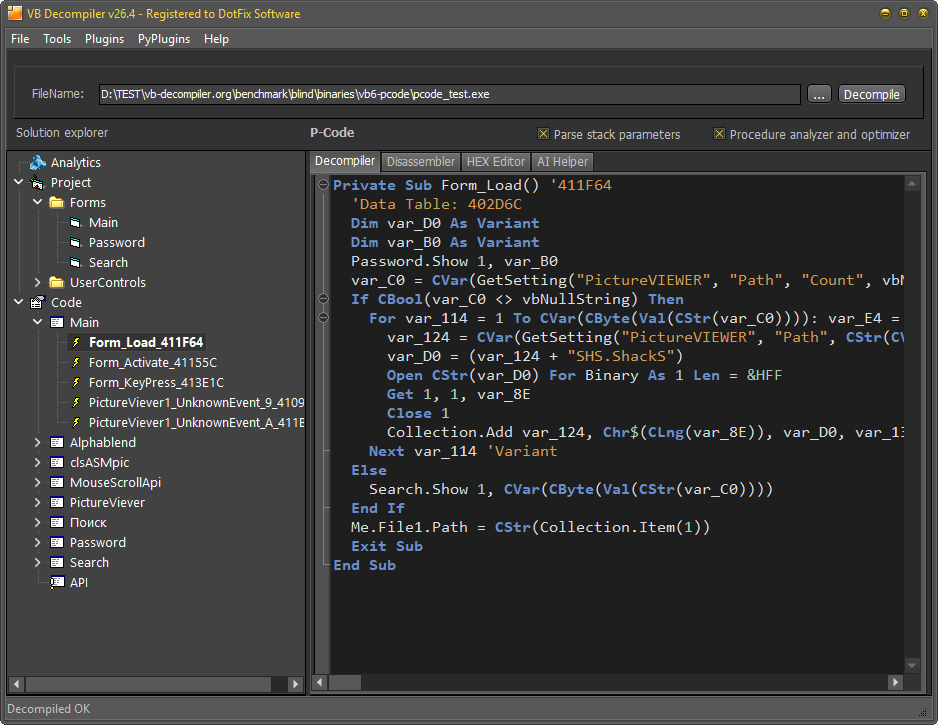
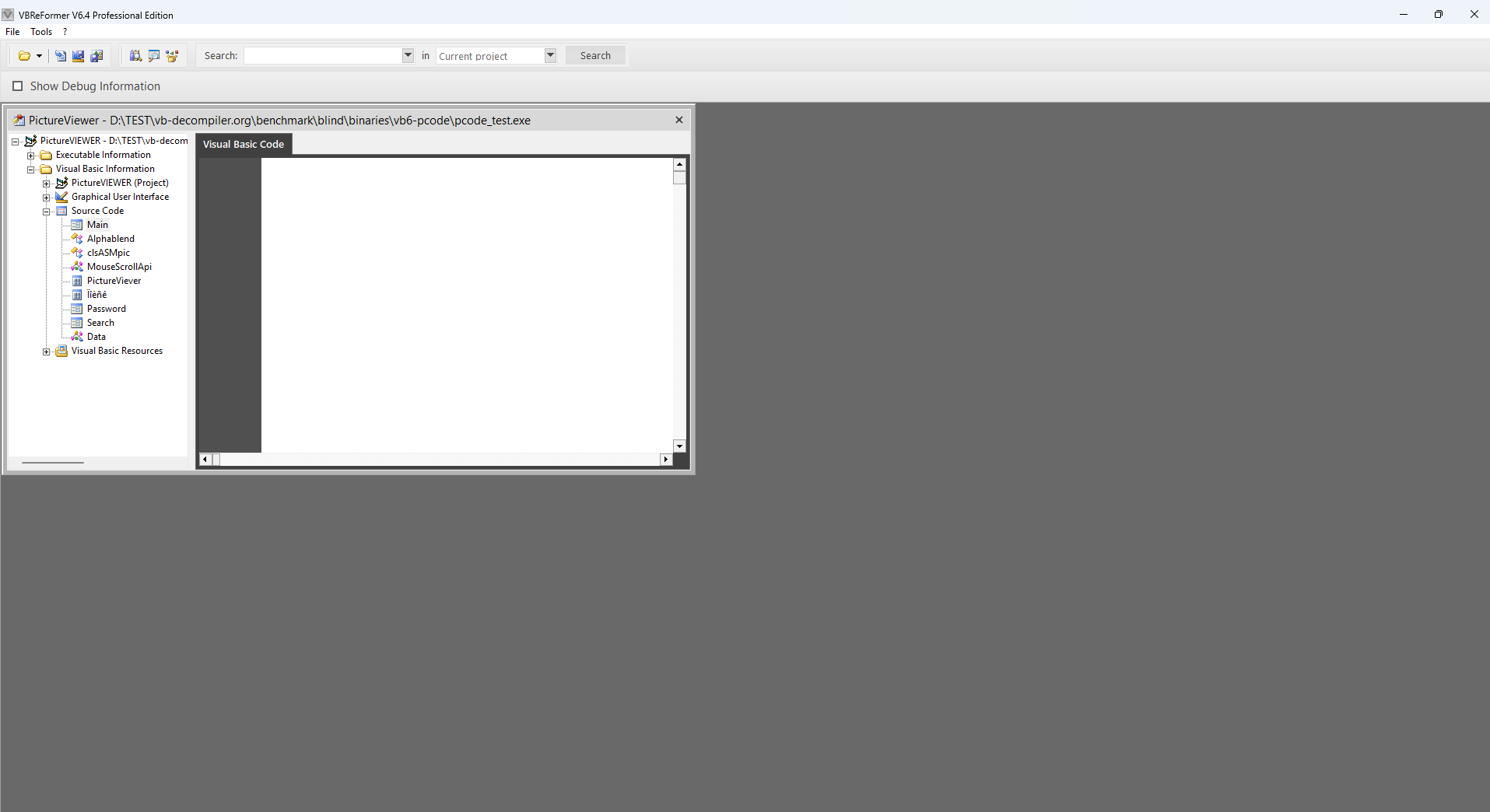
VB Decompiler exposed forms, modules, named procedures and high-level code with file operations, loops, branches and calls. The competitor exposed useful project/module names, but its Visual Basic Code pane remained blank for the selected Main module.
Native Code
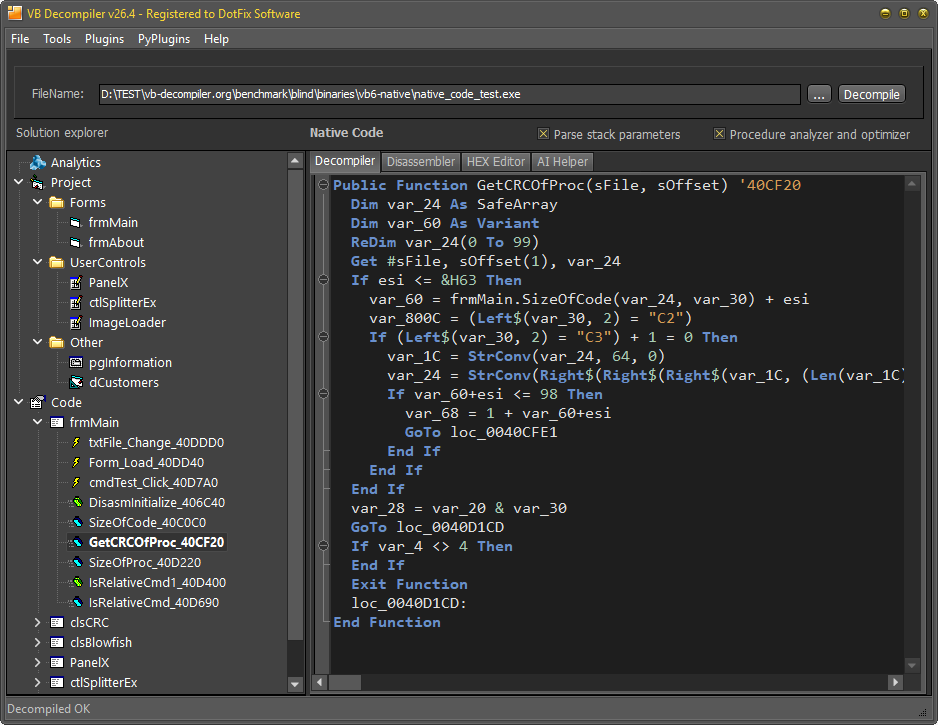
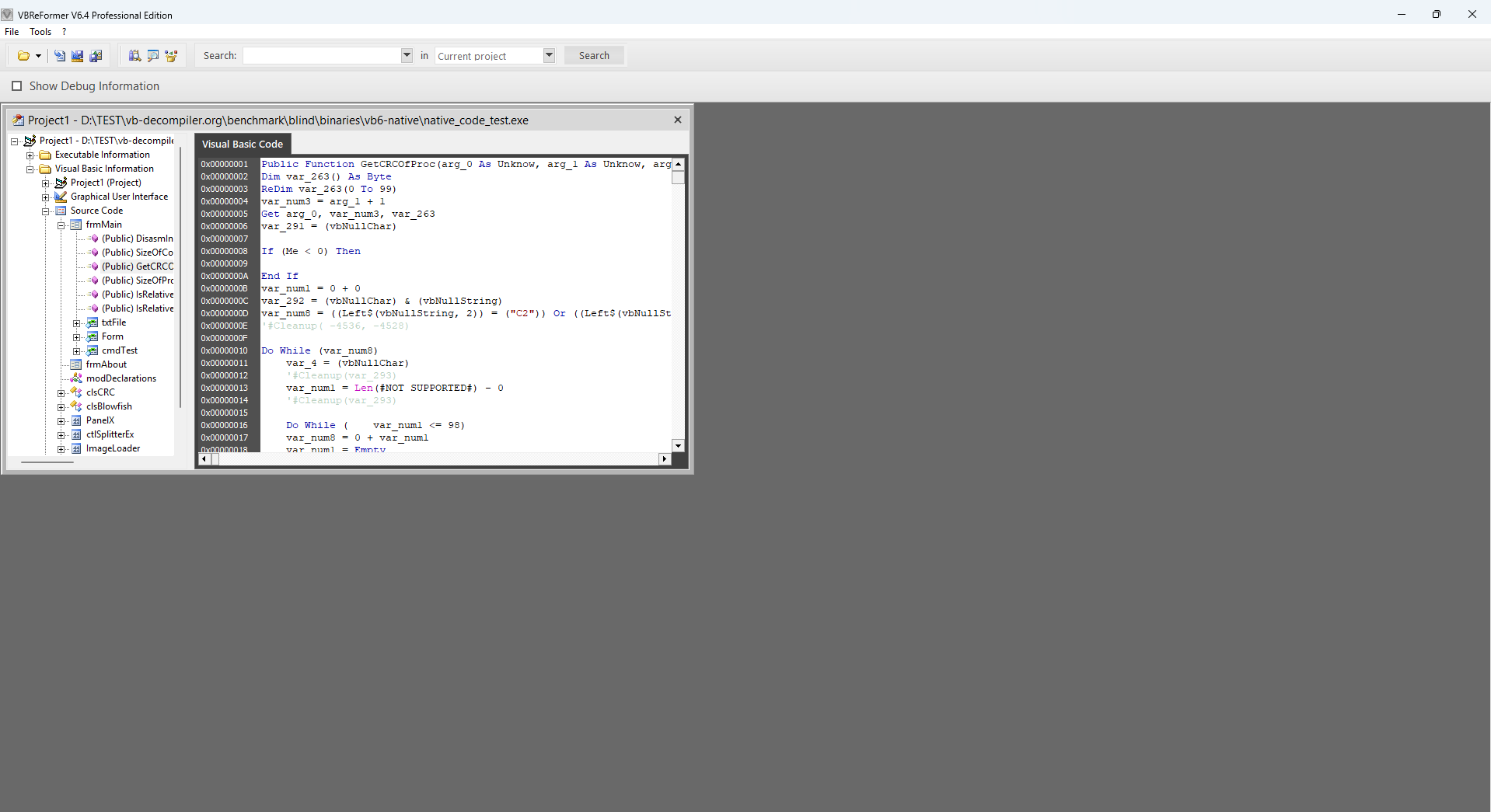
Both products exposed a broad procedure tree and VB-like results. The competing product therefore receives substantial non-zero credit. VB Decompiler produced clearer domain-level expressions, an Analytics summary and text that could be copied directly for search or AI input.
AI readiness
The score measures the semantic context an AI model receives: procedure boundaries, calls, expressions, branches, APIs, strings and exportable text. It does not pretend that an LLM can recover compiler-discarded information.
Why usefulness is the primary metric
Native Code and P-Code compilation both remove information from the original source. A byte-for-byte comparison rewards textual resemblance even when the result is awkward, incomplete or misleading. The practical question for reverse engineering is different: which output makes it easier to determine what the program does and to reconstruct working logic?
- Freeze the rules before opening the inputs. Filenames, sizes and SHA-256 hashes were recorded first. Neither input was inspected with another decompiler, disassembler, strings utility or source repository.
- Capture each normal product workflow. Both products ran on the same host and each tool was allowed its best available normal code view and navigation into internal procedures.
- Score two independent tracks. Human utility asks how quickly and reliably an analyst can understand behavior. AI readiness asks how much faithful, machine-usable context is available for explanation or code reconstruction.
- Measure the relative gap. Coverage contributes 25%, semantic clarity 30%, visible behavior and side effects 20%, navigation 15%, and machine usability 10%.
- Prevent a misleading 10/10. Every score also carries an absolute viability marker: none, weak, usable or strong. If both outputs are useless, both receive 0/10; if they tie, both receive 10/10.
What “AI reconstruction readiness” does and does not prove
This first publication evaluates the quality of input available to an AI model. A fully validated AI benchmark additionally requires isolated prompts, at least three runs per product output, fixed model/version/settings, compilable reconstructions and identical behavioral tests against a ground-truth oracle. Those multi-run behavioral tests have not yet been completed, so the results are explicitly labeled readiness, not proven reconstruction accuracy.
Feature comparison for real analyst workflows
The benchmark above measures recovered-code utility only. The following table separately covers navigation, investigation, editing, extensibility and deployment. This avoids hiding a product's useful workflow feature inside a code-quality number.
| Capability | VB Decompiler 26.4 | VBReFormer 6.4.350 | Evidence / practical impact |
|---|---|---|---|
| Decompilation and code views | |||
| VB5/6 P-Code high-level decompilation | ✓ Supported | ✕ Not observed | The competing product produced no target code in the blind P-Code test. VB Decompiler P-Code details. |
| VB5/6 Native Code decompilation | ✓ Supported | ✓ Supported | Both products produced useful Native Code output; the blind test measures the clarity and machine-usability gap. |
| C# and VB.NET decompilation to C# | ✓ Supported | ✕ Not observed | VB Decompiler .NET decompilation. |
| Switch and merge decompiled/disassembled code | ✓ Supported | ◐ Partially | VB Decompiler can switch between, synchronize and merge decompiled and disassembled code without reanalyzing the project. The competitor can produce disassembly, but the mode must be selected before analysis; changing it requires the project to be analyzed again, which is impractical on large inputs. |
| Visual reconstruction of .NET Windows Forms | ✓ Supported | ✕ Not observed | Static visual form reconstruction, events and menu navigation; WPF visual reconstruction is not claimed. |
| Recover VB5/6 form/project/resource structure | ✓ Supported | ◐ Partially | Both recover project and form metadata. VB Decompiler additionally renders a visual form viewer, emulates standard and many non-standard VB6 controls, and lets the analyst jump from a form object's event directly to its code. The competing product has no equivalent visual viewer or event-to-code navigation. |
| Synchronized decompiled, disassembled and HEX views | ✓ Supported | ✕ Not observed | Inspect the same location across decompiled code, disassembly and HEX-oriented views. |
| Analysis, navigation and modification | |||
| One-click AI Helper for P-Code, Native Code and C# | ✓ Local or API | ✕ Not observed | Built-in prompts and one action; supports local Ollama models and configured cloud APIs. AI post-processing cannot automatically repair missing or incorrectly decompiled semantics. |
| Search inside code and the analyzed project | ✓ Supported | ✕ Not observed | VB Decompiler searches code, functions, strings and references inside the current project. The competitor does not provide an internal code/project search; its search tools are for locating test EXE files and OCX libraries on disk. |
| Linked HEX editor with byte/block editing | ✓ Supported | ✕ Not observed | Navigate by virtual address or file offset and patch bytes or blocks. |
| View/export embedded images and icons | ✓ Supported | ◐ Partially | The competing product can display embedded images but cannot export them to disk. VB Decompiler supports both viewing and export through the FRX Viewer, whose source code is publicly available. |
| Step-by-step P-Code and Native Code emulator/tracer | ✓ Both modes | ✕ Not observed | Inspect CPU/FPU registers, stack and variables without executing instructions on the real CPU; documented emulator limitations still apply. |
| Edit recovered VB5/6 forms and controls | ✕ Not observed | ◐ Partially | Competitor advantage with important limits: it can change visual-object properties such as captions, enabled states and checkbox states, but it cannot edit program code. The form is rebuilt during saving, so overlays or other service data at the end of the executable may be overwritten and the modified file may stop working. This is most suitable for simple projects and raw UI localization. |
| Automated behavior report: files, registry, network, processes | ✓ Supported | ✕ Not observed | Analytics groups relevant routines and references to accelerate malware triage. |
| Named function search and function cross-references | ✓ VB6 and .NET | ✕ Not observed | VB Decompiler function search and reference navigation. |
| Dedicated string search | ✓ Supported | ✕ Not observed | VB Decompiler String Search. |
| All string references, edit each string, jump to using code | ✓ Supported | ✕ Not observed | Central String References workflow; edited text must fit the original binary allocation. |
| Rename recovered local/global variables | ✓ Supported | ✕ Not observed | Rename variables to preserve analyst context; current navigation also finds global-variable references. |
| Extensibility, export and deployment | |||
| Native plugin SDK | ✓ Documented SDK | ✕ Not observed | Callbacks, actions and access to decompiled/disassembled data, with examples in several languages. |
| Analyze .NET assemblies without installing .NET | ✓ No .NET runtime required | ✕ Not observed | VB Decompiler parses metadata and IL without Reflection or .NET libraries. |
| Python plugins | ✓ Supported | ✕ Not observed | Python complements the native SDK for rapid analysis automation; free examples are published on GitHub. Python plugins require a compatible Python runtime; the core decompiler does not. |
| Linux under Wine and macOS through Parallels | ✓ Supported | ✕ Not observed | Mac M1/Parallels and Steam Deck/Wine evidence; compatibility depends on the emulator environment. |
| Export procedure names/addresses to IDA, HIEW and other debuggers | ✓ Supported | ✕ Not observed | Export to MAP, IDC and HIEW NAMET formats to continue analysis in external tools. |
| Core analysis without mandatory external runtimes | ✓ Self-contained core | ✕ Not observed | VB Decompiler's core does not require .NET. Optional AI modes naturally require either a local Ollama installation or access to a configured API. |
| Offline use and offline activation | ✓ Supported | ✓ Supported | Both products can be used offline. VB Decompiler can be installed on an isolated workstation and offline activation is arranged through technical support. Cloud AI is optional, not required for decompilation. |
What was observed in the blind samples
Reproducibility identifiers
| Artifact | Size | SHA-256 |
|---|---|---|
| P-Code blind input | 90,112 bytes | 432A962E8120064E9703659BFCDAEEB5A02A1DB2894F9916CAD3A3BB085AE280 |
| Native Code blind input | 208,896 bytes | 24C6A676A889AE304028227C2C88AE1F198925FB5F0E44FDFE5250E2271E60F5 |
| VB Decompiler 26.4 tested executable | — | 136F16B680EC917E52813A3FB1CB0EF7D44B834A4AA73461F6327F8E25B87F93 |
| VBReFormer 6.4.350 tested executable | — | 4C512D0FE4E0428ACA6D4FECD6AA2E8CB791C572922789F4B4533329A67C4206 |
The test executables themselves are not redistributed from this page. Their hashes make it possible to identify the exact inputs if they are supplied independently.
Limitations and update policy
- Two blind binaries are meaningful evidence, not a universal sample of every compiler option, obfuscator, ActiveX dependency or coding style.
- The Native Code result is based on matched procedures including
DisasmInitialize,GetCRCOfProcandEncryptByte. More matched samples will strengthen the whole-binary estimate. - No original source or behavioral oracle was available, so neither product's output is certified as semantically identical to the unknown source.
- The current AI score evaluates input readiness. It will be updated separately when isolated multi-run reconstruction, compilation and behavioral testing are complete.
- This is a version-specific snapshot. Any later release must be tested separately before its capabilities can be included.
Which product is the better fit?
Choose VB Decompiler when the goal is deep code understanding across VB5/6 P-Code, VB5/6 Native Code and .NET, especially when you need AI-assisted cleanup, static tracing, behavior analytics, synchronized low-level views, references, extensibility and offline analysis.
The competing product is relevant for a narrow VB6 form-editing task: changing a button or window caption, enabling or disabling a control, changing a checkbox state, or performing a raw translation of a simple interface. It cannot edit program code, and rebuilding the form can damage executables that contain overlays or other appended service data. For all other workflows covered by this comparison, VB Decompiler is the preferable choice.
© Sergey Chubchenko, DotFix Software