
Visual .NET Form Reconstruction and a New Hotkey-Driven Workflow in VB Decompiler v26.4
We are pleased to announce the release of VB Decompiler version 26.4. This release introduces a feature we are especially proud of: a fully static, visual reconstruction of Windows Forms inside .NET assemblies, rendered entirely by our own engine without ever loading the .NET runtime. It also adds visual reconstruction of decompiled menus for Visual Basic 5.0 and 6.0 applications. Alongside these, this version brings a complete keyboard- and mouse-driven navigation workflow for reverse engineers, smarter address detection, and broader support for obfuscated .NET metadata.
Visual Form Reconstruction for .NET Assemblies
When analyzing a .NET application, one of the most time-consuming tasks is understanding what a form actually looks like. Until now, you had to read the
InitializeComponent method line by line and assemble the layout in your head. VB Decompiler v26.4 changes this completely.
The decompiler now detects Windows Forms inside classes by analyzing their
InitializeComponent method, and reconstructs a visual preview of each form, showing it close to how the end user would actually see it. A large set of standard controls is supported, including labels, buttons, text boxes, panels, combo boxes, radio buttons, checkboxes, and more.
- No .NET required: This is the key point. VB Decompiler does not use .NET, its runtime, or any of its classes to do this. Form parsing and rendering is entirely our own code, and works even on a system where the .NET Framework is not installed at all.
- Static emulation: Because the form is reconstructed through static analysis rather than real execution, some elements may be unsupported or rendered slightly differently. In practice, however, around 90% of forms are shown faithfully, giving you an immediate, accurate picture of the interface.
- Full image support: Images placed on controls, backgrounds, and other surfaces are rendered as well, including icons, PNG, JPG, and other formats.
- WPF: Only Windows Forms are supported at this stage. WPF is not yet supported.
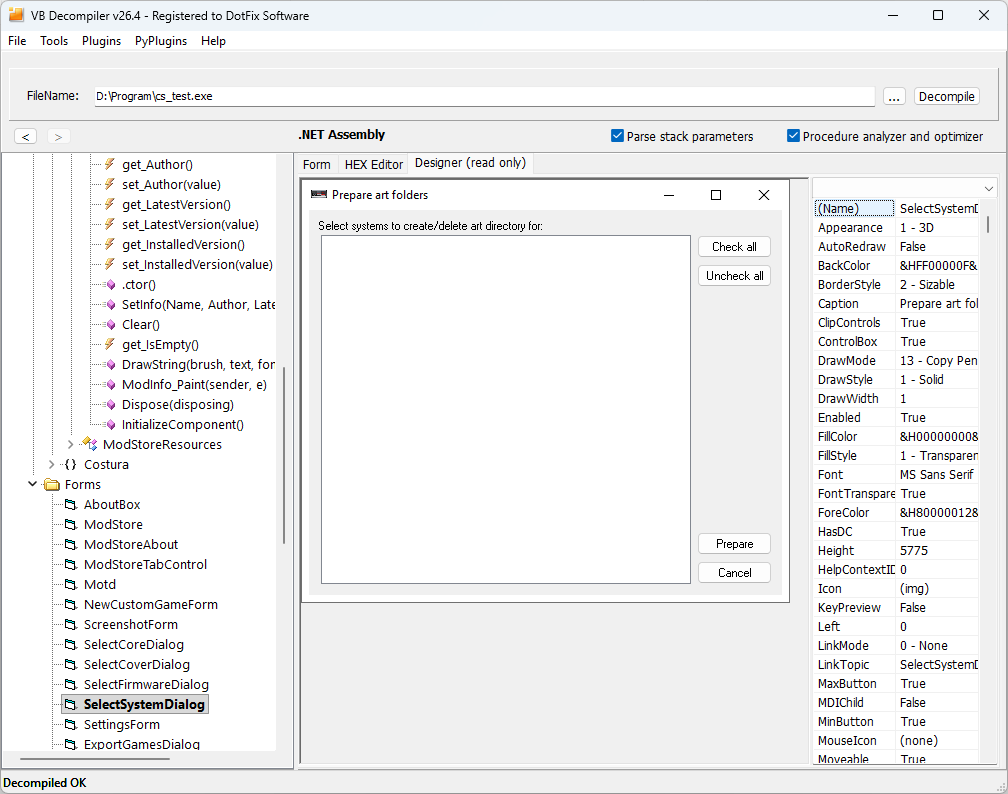
The reconstruction handles dense, real-world interfaces as well, not just simple dialogs. Complex forms with many grouped controls, option groups, and embedded image areas are laid out in a single pass.

From the Form Straight to the Code
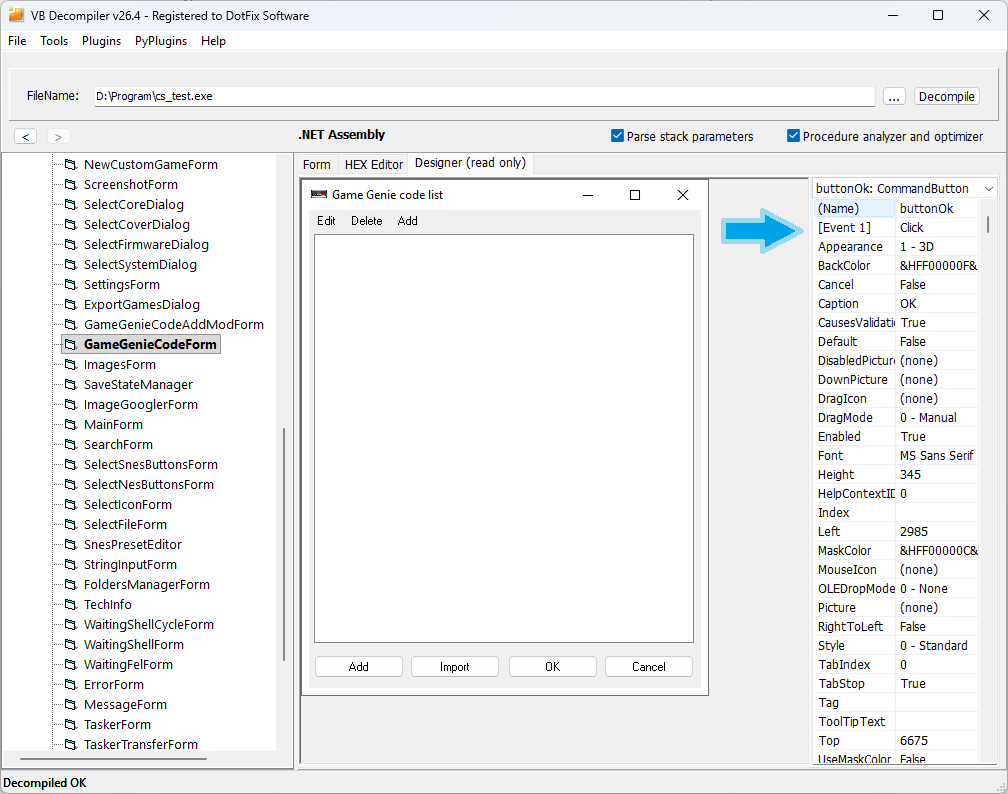
Visual reconstruction is not just a static picture. The form preview is fully interactive and tied directly to the decompiled code, turning it into a navigation surface for analysis:
- Click to inspect events: Click any control on the reconstructed form, and the side panel lists the events that belong to that specific control.
- Double-click to jump to code: Double-clicking an event takes you straight to the decompiled code of the corresponding event handler. There is no need to search the listing manually for the method behind a button or a text field.
This makes it possible to navigate a .NET application the way its developer thought about it, from interface to behavior, rather than from raw code outward. For analysts and malware researchers working with C# and Visual Basic .NET applications, this is a genuine must-have, and to the best of our knowledge it is currently not available in any other tool.
Export Form Images via the FRX Viewer Plugin
All images placed on the reconstructed forms can be extracted. Through the FRX Viewer plugin, you can export every image embedded in a form, including icons and bitmaps used on controls and backgrounds. This is useful both for asset recovery and for documenting an application's interface during analysis. The source code of the plugin is available on GitHub.
Visual Reconstruction of Decompiled Menus
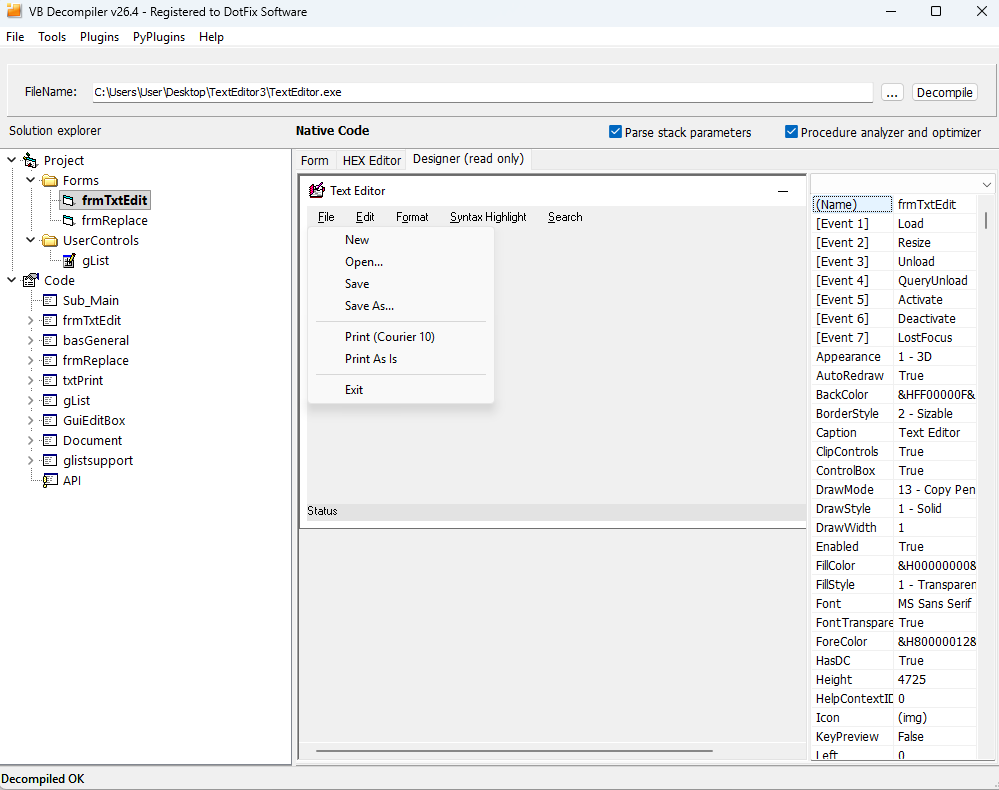
Form layout is only half of an application's interface; the other half is its menus. Version 26.4 adds visual reconstruction of decompiled menus, so you can now see exactly how the menu of each decompiled form looked to the user.
- Full Visual Basic 5.0 and 6.0 support: Menu reconstruction works for VB5 and VB6 applications regardless of the compilation type. Both P-Code and Native Code binaries are fully supported, with no difference in the result.
- Per-form menus: The menu is shown in a header of the form, giving you a complete picture of each window, its controls and its menu structure together.
- .NET forms: For .NET forms, menu reconstruction is currently supported only partially, and will be expanded in future versions.
A Full Keyboard and Mouse Workflow for Reverse Engineers
Experienced reverse engineers live on hotkeys. In some popular disassemblers and debuggers this is easy, because the interface is essentially plain text. VB Decompiler has a richer interface, with a tree, code views, and editable input fields, so we designed a context-aware shortcut system: each shortcut is dispatched based on what currently has focus, and shortcuts never interfere with normal text entry in input fields.
In the decompiler code window, the following shortcuts are now available:
- N — Rename the variable under the caret.
- X — Find references to the global variable under the caret.
- D — Copy the current code into the disassembler window, producing a mixed decompiled/disassembled view.
- F4 — Trace to the address on the current line.
- Ctrl+Shift+Z — Undo renaming variable under cursor (this reverts a rename, and is independent from text editing undo).
In the tree of classes, modules, and functions:
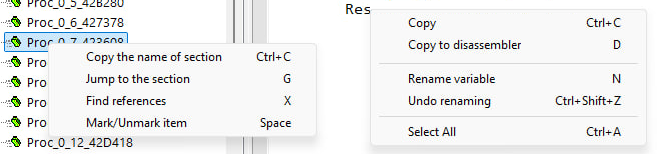
- X — Find references to the selected function in calls from other functions.
- G — Jump to a section by its tree path.
- Ctrl+C — Copy the full tree path of the selected node (for example,
Project -> Modules -> Product.Core.IO.Ntfs -> FileSystem -> AlternateDataStreamExists(file, streamName)), which can then be pasted into the "Jump to the section" field to navigate instantly. - Space or Insert — Mark or unmark an item in the tree.
The same shortcut can carry the same meaning in different contexts: pressing X in the tree finds references to a function, while pressing X in the code finds references to a global variable. The action follows the focused view, exactly as an analyst would expect.
Mouse Back/Forward Navigation
Navigation history is now also wired to the dedicated side buttons found on most mice. The back and forward buttons move you to the previously and next decompiled function in a click-history, mirroring the on-screen navigation arrows. This small addition makes moving through a call chain feel natural and keeps your hand on the mouse during analysis.
Smarter Address Detection in "Trace to This Address"
The "Trace to this address" command has been made more forgiving. Previously, it only worked if you clicked exactly on a
loc_ label. Now the command inspects the beginning of the current line, trims leading whitespace, and identifies the first token: if it is a loc_ label followed by an address, tracing starts correctly. In practice this means you can click anywhere on the line, not just precisely on the label, and the tracer will still resolve the right address.
Broader Support for Obfuscated .NET Metadata
This release continues to harden the .NET decompiler against obfuscation:
- FieldPtr table: Added support for the .NET
FieldPtrtable, which is frequently encountered when analyzing obfuscated .NET applications. - Large argument indices: Added support for .NET procedure arguments with indices greater than a 32-bit signed integer, a construct found only in obfuscated code.
Bug Fixes
- Huge obfuscated .NET procedures: Fixed handling of extremely large obfuscated .NET procedures.
- Obfuscated P-Code object names: Fixed decompilation of P-Code methods with obfuscated object names, which previously could cause the decompiler to hang.
- IL "callvirt" instruction: Fixed a case where the IL
callvirtinstruction could be decompiled incorrectly when the table entry number was 255. - FRX Viewer plugin: Fixed an issue where the plugin failed to load correctly if the previously opened file contained no images. The source code for the fixed version of the plugin is also available on GitHub.
© Sergey Chubchenko, VB Decompiler main developer
Visual Basic, Visual Studio, .NET, and Windows are registered trademarks of Microsoft Corporation.