Application structure
Forms, modules, classes, procedures, event handlers, and known runtime relationships provide a map of the project.

Legacy project recovery
A compiled file cannot contain every detail of the original project, but it can still preserve enough code behavior, forms, controls, events, strings, APIs, and resources to rebuild a maintainable replacement.
Forms, modules, classes, procedures, event handlers, and known runtime relationships provide a map of the project.
P-Code or native x86 can be reconstructed into analyst-oriented code in licensed editions, with disassembly available alongside it.
Form layouts, standard controls, properties, and event bindings can be inspected visually and exported as recovery material.
Strings, icons, images, FRX resources, API usage, and references help restore both interface and logic.
Comments, original formatting, meaningful local-variable names, and source-only design decisions are generally absent after compilation. Forms, event relationships, strings, APIs, disassembly, and references provide the evidence needed to repair the reconstruction, but this is still software-development work.
The approximate 85% figure is not a guarantee for an individual file. Obfuscation, protection, damage, unusual controls, and compiler-specific patterns can lower recovery.
VB Decompiler's AI Helper can pass selected decompiled code through prepared prompts to a local offline model or through the OpenAI API. AI can explain difficult fragments, propose names, simplify control flow, and help convert the recovered output into cleaner VB5/6 or migration code. Its suggestions still need developer review and validation against the binary.
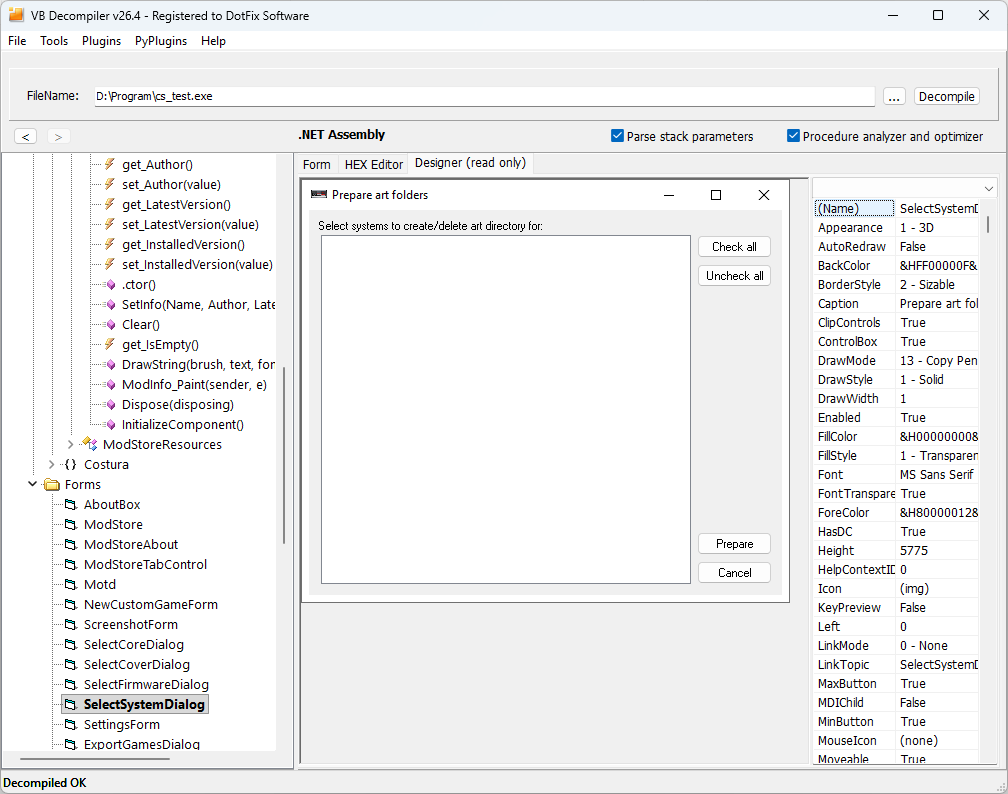
Lite can identify the format, show disassembly, and recover the visual portion of VB5/6 forms. Choose a paid edition only when you know which code-recovery features the project needs.