
AI Code Enhancement
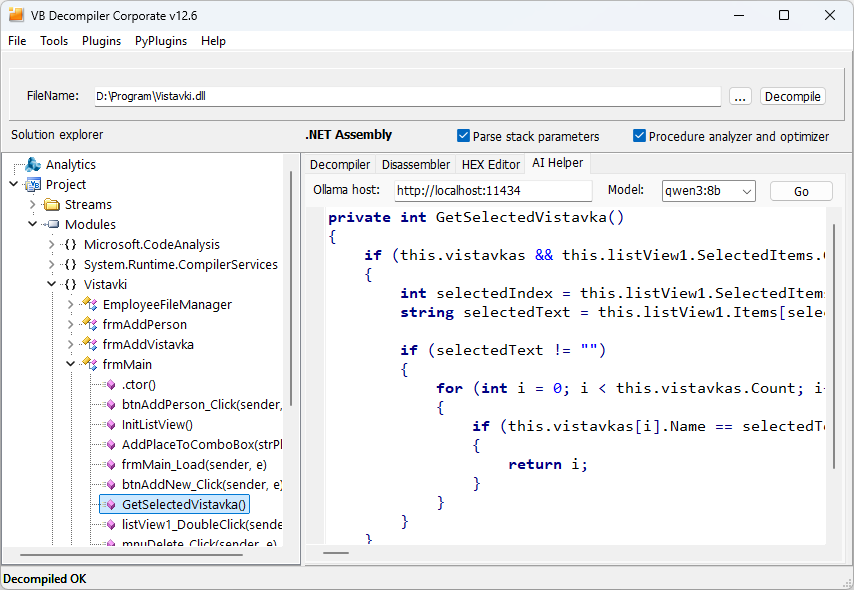
AI Helper processes code that VB Decompiler has already reconstructed. It supports decompiled C# from .NET assemblies and Visual Basic 5.0/6.0 code from P-Code or Native Code. You can use a local model through Ollama or connect to a service through the OpenAI API integration.
AI can suggest clearer control flow, variable names, declarations, and expressions. It cannot reliably restore information absent from the binary or repair a fragment that the decompiler has interpreted incorrectly. Compare suggestions with the original decompiled listing, disassembly, and surrounding procedures before using them in recovered source or an investigation report.
Processing a procedure
- Open the required procedure in Solution explorer and review its Decompiler listing.
- Switch to AI Helper and configure the provider, host, and model as described below.
- Start processing with the action button beside the model selector.
- Review the returned code in AI Helper and compare it with the decompiler's output.
AI processing runs in a separate thread. Use Cancel if the model takes too long to respond. Secondary connection settings can be collapsed to leave more space for code.
Using a local model through Ollama
- Install Ollama from its official download page and start it.
- Download the recommended model by running
ollama pull qwen3:8bin a terminal. - Select the local LLM/Ollama provider in AI Helper. Set Ollama host to the server address; the default local address is
http://localhost:11434. - Select the installed model in Model and start processing.
We recommend qwen3:8b. AI Helper's built-in prompts are tuned for this lightweight model. Newer models can take longer to process the code without improving the result.
Model selection is unrestricted: you can choose any model installed in the selected Ollama instance. With an unfamiliar model, the response parser may leave model-specific tags or other auxiliary text in the displayed result.
Hardware for local Ollama inference
Local AI processing runs on the computer hosting Ollama and requires substantially more resources than decompilation. The following practical configurations assume qwen3:8b with Q4_K_M weights, the standard f16 context cache, and one request at a time. Context is measured in tokens: 4K means 4096 tokens and 128K means 131072 tokens. The budget includes the instructions, source code, and generated response.
| Component | Practical minimum: 4K context | Recommended: 128K context |
|---|---|---|
| Operating system | 64-bit Windows 10 (22H2) or Windows 11 | 64-bit Windows 10 (22H2) or Windows 11 |
| Processor | Modern x64 CPU with AVX2 and at least 4 physical cores | Modern x64 CPU with AVX2 and at least 8 physical cores |
| System memory (RAM) | 16 GB | 64 GB |
| Graphics card | Ollama-compatible GPU with at least 8 GB of dedicated VRAM | Ollama-compatible GPU with at least 32 GB of dedicated VRAM |
| Storage | SSD with at least 20 GB free for Ollama and this model | SSD with at least 20 GB free for Ollama and this model |
Set the context size with the slider in Ollama settings. An 8 GB graphics card suitable for 4K is not sufficient for the 128K configuration above. The model download is approximately 5.2 GB; this is not its total memory requirement. At 128K, the f16 context cache alone is approximately 18 GiB, before model weights and working buffers. Leave memory available for Windows and other applications.
Ollama can use the CPU when sufficient RAM is available, but code processing can be very slow. Pentium M systems and similarly old computers are unsuitable for local qwen3:8b inference. Shared memory used by legacy Intel HD Graphics does not replace the dedicated VRAM specified above. These requirements apply to the Ollama host; a remote server or external API service uses its own hardware.
For short procedures, start with 4K. A larger context increases memory use and the time needed to process long input. If processing is too slow, cancel it, reduce the context, and check GPU use with ollama ps. Actual memory use depends on the Ollama version, backend, and other running workloads.
Using the OpenAI API integration
Set Provider to OpenAI API. Configure Host, API key, and Model for the intended service. Enter a valid API key and a model identifier available to that key. Keep API keys out of screenshots and shared analysis material.
AI Helper also supports DeepSeek through the OpenAI API provider. Enter the DeepSeek host, API key, and model identifier in the corresponding fields. The screenshot below shows this configuration.

Where the code is processed
AI Helper sends the current decompiled code to the configured service. For a local-only workflow, use a locally running Ollama server and a locally executed model. An Ollama host on another machine, an Ollama cloud model, or an external API service can transfer code outside the analysis workstation.
For confidential source recovery or security investigations, choose the endpoint according to your organization's data-handling requirements. Do not infer offline operation solely from the presence of Ollama or a localhost URL.
Troubleshooting
- If a local model is missing, confirm that it is installed in the Ollama instance specified by the host field.
- If there is no response, check that the selected service is running and reachable, and that the endpoint, credential, and model identifier correspond to the same provider.
- If processing is too slow, cancel it. When using another local model, try the recommended
qwen3:8bmodel. - If an unfamiliar model leaves tags or other auxiliary text in its response, try
qwen3:8bor remove that text manually while reviewing the result. - If the result changes a condition, call, constant, or type unexpectedly, verify it against the low-level listing. Readability alone does not establish equivalent behavior.
Ollama and the external model providers are third-party products. Their availability, model behavior, and service policies are independent of VB Decompiler.