
Disassembler
This block of options is responsible for disassembling machine code:
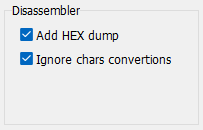
Add HEX Dump displays machine codes before each disassembled command, which may be necessary only when modifing the binary file after analysis in a HEX Editor.
Ignore chars convertions is used to disable converting non-English string data into numerical Unicode. Enabling this option makes the displayed strings easier to read. Disable it when you need the numeric Unicode representation.
Show user classes includes parsing user classes inside Delphi / Free Pascal applications. This option is not used for Visual Basic and C# applications.
Show VCL classes includes decompiling all internal classes of the VCL library. It is recommended to disable this option so that the disassembler does not analyze thousands of service classes, which are usually unnecessary when analyzing programs. This option is only used for decompiling Delphi applications for internal purposes and was created for unification with other products, but it is not implemented in VB Decompiler.
Partial decompilation of Delphi and Free Pascal applications is currently offered exclusively as a separate service (not as a software).
VB P-Code and .NET IL
Add HEX Dump also supports the low-level P-Code listing. Use Copy to disassembler from the Decompiler view when you need to compare recovered statements with P-Code or native instructions in one listing.
For .NET assemblies, the Disassembler can show IL or native x86/x64 methods as applicable. Recovered local-variable signatures can include arrays, generics, value types, and TypeSpec references. Enable Show .NET structures when you need to inspect metadata tables and heaps alongside the code. Later releases expand support for obfuscated metadata, including the FieldPtr table; this does not guarantee successful recovery of every damaged or obfuscated assembly.