
Analytic features
Licenses with Analytic features generate categorized reports of recognized operations in the analyzed program. These reports help security analysts identify procedures worth investigating before reading the entire codebase. They support Visual Basic 5.0/6.0 applications and, from version 11.7, .NET assemblies.
Generating a report
- Enable Analyze prototypes in Tools > Options.
- Open the file and wait for analysis to complete. With the required license and settings, the report is generated and displayed automatically.
- Review the categories, then open relevant procedures and inspect their code and string references.
Categories cover recognized operations such as file and volume access, registry access, network activity, process creation, window operations, and selected VB internal functions such as CallByName and VarPtr.
Quick report and string context
The quick report lists addresses and names of procedures containing recognized operations. The extended report adds the available string references from those procedures. This context can reveal candidate paths, registry keys, host names, or other values that deserve examination.
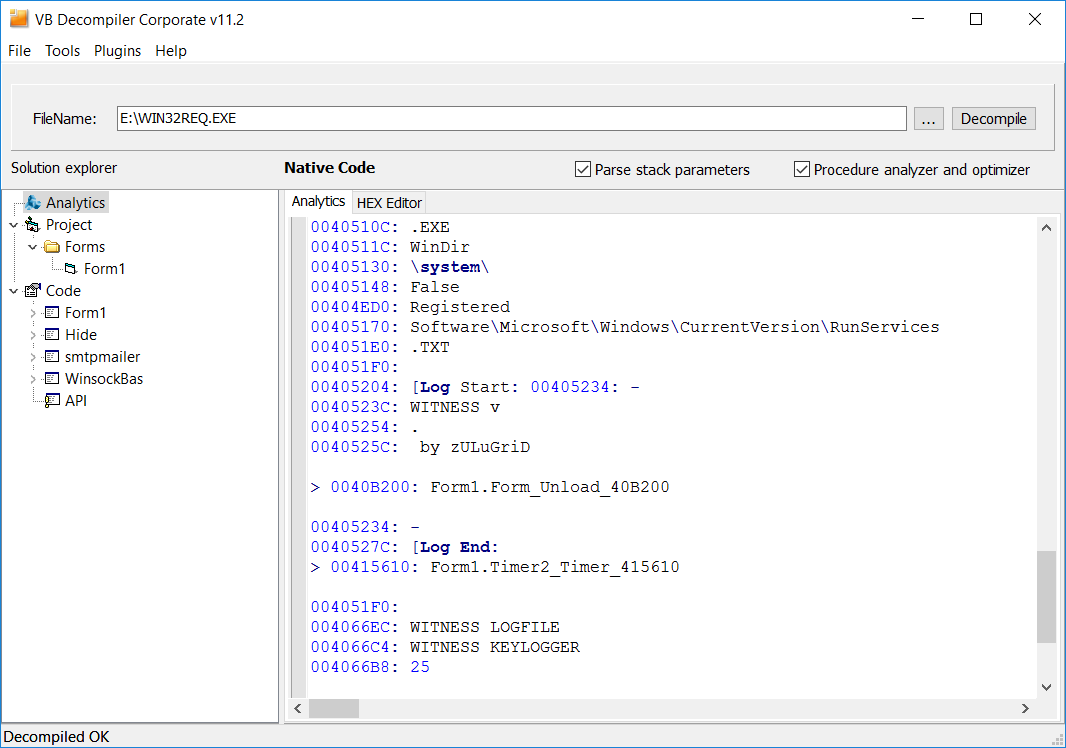
Strings that are encrypted, obfuscated, or generated at runtime may be absent. A string associated with a procedure is useful context, but does not by itself prove that it is passed to a particular API call or that a branch is executed.
Navigating and saving results
Double-click a procedure name in the report to open its code. Double-click an address preceding a procedure or string to inspect its location in the HEX Editor. Use the A button above the object tree to return to the report at the previous position, and the navigation arrows or Esc to revisit inspected procedures.
Select and copy report text as needed, or choose File > Save analytics report to save it for further analysis.
Interpreting findings
The report identifies statically recognized code patterns and references. It is a triage aid, not a record of observed execution or an automatic verdict that a file is malicious. Indirect calls, unresolved external interfaces, damaged metadata, obfuscation, and runtime-generated values can limit coverage. Confirm significant findings in the corresponding procedures, disassembly, and file data.
For deeper inspection of VB5/6 reconstruction, see Tracing. For literal strings and their code locations, see String References.