
Esquema de cores
Esta seção define o esquema de cores e o realce de sintaxe ao visualizar código em um descompilador:
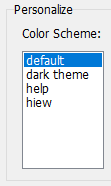
Os presets são armazenados na pasta "colors" dentro dos arquivos .ini localizados no diretório onde o VB Decompiler foi instalado. Os nomes dos arquivos determinam os nomes do preset na seção de configurações do programa. Estes arquivos possuem um formato simples, e você pode facilmente criá-los ou editar os existentes.
O formato de configuração é o seguinte:
[Colors]
Background = decimal color code (for example: 1973790)
Foreground = decimal color code (for example: 14671840)
KeyWords = decimal color code (for example: 13471849)
LocationsAndArguments = decimal color code (for example: 11849128)
Procedures = decimal color code (for example: 5676246)
; next properties is only available in version 12 or later
UnderCursorBackground = decimal color code (for example: 6986069)
UnderCursorForeground = decimal color code (for example: 1973790)
UseDarkMode = 0 or 1 (0 for Light Theme, 1 for Dark Theme)
Colors2 = 0 or 1 (using extended colors at Colors2 section)
[Font]
Name = font name (for example: Consolas)
Size = font size (for example: 11)
KeyWordsBold = 0 or 1 (font bold)
LocationsAndArgumentsBold = 0 or 1 (font bold)
ProceduresBold = 0 or 1 (font bold)
; this section is only available in version 12 or later
[Colors2]
TVFontName = Solution Explorer treeview font name or list of font names, separated by comma (for example: Segoe UI, Tahoma, Arial)
TVFontSize = size of the font (for example: 10)
FontName = Decompiler and Disassembler font name or list of font names, separated by comma (for example: Courier New, Consolas, Liberation Mono, monospace)
FontSize = size of the font (for example: 11)
Background = BackColor in hexadecimal for Decompiler and Disassembler tab (for example: 1E1E1E)
Foreground = ForeColor in hexadecimal for Decompiler and Disassembler tab (for example: DFDFE0)
; code highllighting
Key = color in hexadecimal (for example: CD9069)
Comment = color in hexadecimal (for example: CD9069)
Char = color in hexadecimal (for example: B4CDA8)
Float = color in hexadecimal (for example: B4CDA8)
Hex = color in hexadecimal (for example: B4CDA8)
Number = color in hexadecimal (for example: B4CDA8)
String = color in hexadecimal (for example: 569CD6)
Symbol = color in hexadecimal (for example: DFDFE0)
; HEX Editor font and colors
HexFontName = font name or list of font names, separated by comma (for example: Courier New, Consolas, Liberation Mono, monospace)
HexFontSize = size of the font (for example: 11)
HexBackground = color in hexadecimal (for example: 1E1E1E)
HexForeground = color in hexadecimal (for example: DFDFE0)
HexGrid = color in hexadecimal (for example: 1E1E1E)
HexActiveFieldBackground = color in hexadecimal (for example: 1E1E1E)
HexOffsetBackground = color in hexadecimal (for example: 1E1E1E)
HexCurrentOffset = color in hexadecimal (for example: B4CDA8)
HexOddColumn = color in hexadecimal (for example: B4CDA8)
HexEvenColumn = color in hexadecimal (for example: B4CDA8)
HexOffset = color in hexadecimal (for example: 569CD6)
O código de cor é especificado no formato true-color de 32-bits. Decimal na seção Colors (para compatibilidade com versões antigas do VB Decompiler) e hexadecimal na seção Colors2.
Mudança de temas durante a análise de código
O sistema de temas suporta modo escuro e pode aplicar um tema selecionado sem reiniciar o VB Decompiler, incluindo após editar seu arquivo INI. As configurações de fonte na configuração estendida podem conter nomes de fallback separados por vírgula, o que ajuda quando fontes equivalentes diferem entre Windows e ambientes de compatibilidade.
As cores sob o cursor controlam o realce de identificadores. Consulte Visualização de código para realce de variáveis locais, membros e globais.