
配色
このセクションでは、逆コンパイラでコードを表示する際のカラースキームと構文ハイライトを定義します:
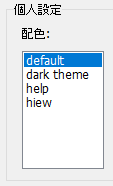
プリセットは、VB Decompiler がインストールされているディレクトリ内の .ini ファイルにある "colors" フォルダに格納されます。ファイル名がプログラム設定セクションでのプリセット名を決定します。これらのファイルは単純な形式であり、ご自身で簡単に作成したり、既存のものを編集したりできます。
設定形式は以下の通りです:
[Colors]
Background = decimal color code (for example: 1973790)
Foreground = decimal color code (for example: 14671840)
KeyWords = decimal color code (for example: 13471849)
LocationsAndArguments = decimal color code (for example: 11849128)
Procedures = decimal color code (for example: 5676246)
; next properties is only available in version 12 or later
UnderCursorBackground = decimal color code (for example: 6986069)
UnderCursorForeground = decimal color code (for example: 1973790)
UseDarkMode = 0 or 1 (0 for Light Theme, 1 for Dark Theme)
Colors2 = 0 or 1 (using extended colors at Colors2 section)
[Font]
Name = font name (for example: Consolas)
Size = font size (for example: 11)
KeyWordsBold = 0 or 1 (font bold)
LocationsAndArgumentsBold = 0 or 1 (font bold)
ProceduresBold = 0 or 1 (font bold)
; this section is only available in version 12 or later
[Colors2]
TVFontName = Solution Explorer treeview font name or list of font names, separated by comma (for example: Segoe UI, Tahoma, Arial)
TVFontSize = size of the font (for example: 10)
FontName = Decompiler and Disassembler font name or list of font names, separated by comma (for example: Courier New, Consolas, Liberation Mono, monospace)
FontSize = size of the font (for example: 11)
Background = BackColor in hexadecimal for Decompiler and Disassembler tab (for example: 1E1E1E)
Foreground = ForeColor in hexadecimal for Decompiler and Disassembler tab (for example: DFDFE0)
; code highllighting
Key = color in hexadecimal (for example: CD9069)
Comment = color in hexadecimal (for example: CD9069)
Char = color in hexadecimal (for example: B4CDA8)
Float = color in hexadecimal (for example: B4CDA8)
Hex = color in hexadecimal (for example: B4CDA8)
Number = color in hexadecimal (for example: B4CDA8)
String = color in hexadecimal (for example: 569CD6)
Symbol = color in hexadecimal (for example: DFDFE0)
; HEX Editor font and colors
HexFontName = font name or list of font names, separated by comma (for example: Courier New, Consolas, Liberation Mono, monospace)
HexFontSize = size of the font (for example: 11)
HexBackground = color in hexadecimal (for example: 1E1E1E)
HexForeground = color in hexadecimal (for example: DFDFE0)
HexGrid = color in hexadecimal (for example: 1E1E1E)
HexActiveFieldBackground = color in hexadecimal (for example: 1E1E1E)
HexOffsetBackground = color in hexadecimal (for example: 1E1E1E)
HexCurrentOffset = color in hexadecimal (for example: B4CDA8)
HexOddColumn = color in hexadecimal (for example: B4CDA8)
HexEvenColumn = color in hexadecimal (for example: B4CDA8)
HexOffset = color in hexadecimal (for example: 569CD6)
カラーコードは 32 ビットの真色形式で指定されます。Colors セクションでは 10 進数(VB Decompiler の旧バージョンとの互換性のため)、Colors2 では 16 進数です。
コード解析中のテーマ変更
テーマシステムはダークモードをサポートしており、VB Decompiler を再起動せずに選択したテーマを適用できます。INI ファイルの編集後にも同様です。拡張設定内のフォント設定には、コンマ区切りのフォールバック名を含めることができ、Windows と互換環境間で同等のフォントが異なる場合に役立ちます。
カーソル下の色は識別子のハイライトを制御します。ローカル変数、メンバー変数、グローバル変数のハイライトについては コードの表示 を参照してください。