
配色方案
本节定义了查看反编译器中的代码时的配色方案和语法高亮:
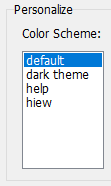
预设值存储在 VB Decompiler 安装目录中的.ini 文件内的"colors"文件夹中。文件名决定了程序设置部分中的预设名称。这些文件格式简单,您可以轻松自行创建或编辑现有文件。
配置格式如下:
[Colors]
Background = decimal color code (for example: 1973790)
Foreground = decimal color code (for example: 14671840)
KeyWords = decimal color code (for example: 13471849)
LocationsAndArguments = decimal color code (for example: 11849128)
Procedures = decimal color code (for example: 5676246)
; next properties is only available in version 12 or later
UnderCursorBackground = decimal color code (for example: 6986069)
UnderCursorForeground = decimal color code (for example: 1973790)
UseDarkMode = 0 or 1 (0 for Light Theme, 1 for Dark Theme)
Colors2 = 0 or 1 (using extended colors at Colors2 section)
[Font]
Name = font name (for example: Consolas)
Size = font size (for example: 11)
KeyWordsBold = 0 or 1 (font bold)
LocationsAndArgumentsBold = 0 or 1 (font bold)
ProceduresBold = 0 or 1 (font bold)
; this section is only available in version 12 or later
[Colors2]
TVFontName = Solution Explorer treeview font name or list of font names, separated by comma (for example: Segoe UI, Tahoma, Arial)
TVFontSize = size of the font (for example: 10)
FontName = Decompiler and Disassembler font name or list of font names, separated by comma (for example: Courier New, Consolas, Liberation Mono, monospace)
FontSize = size of the font (for example: 11)
Background = BackColor in hexadecimal for Decompiler and Disassembler tab (for example: 1E1E1E)
Foreground = ForeColor in hexadecimal for Decompiler and Disassembler tab (for example: DFDFE0)
; code highllighting
Key = color in hexadecimal (for example: CD9069)
Comment = color in hexadecimal (for example: CD9069)
Char = color in hexadecimal (for example: B4CDA8)
Float = color in hexadecimal (for example: B4CDA8)
Hex = color in hexadecimal (for example: B4CDA8)
Number = color in hexadecimal (for example: B4CDA8)
String = color in hexadecimal (for example: 569CD6)
Symbol = color in hexadecimal (for example: DFDFE0)
; HEX Editor font and colors
HexFontName = font name or list of font names, separated by comma (for example: Courier New, Consolas, Liberation Mono, monospace)
HexFontSize = size of the font (for example: 11)
HexBackground = color in hexadecimal (for example: 1E1E1E)
HexForeground = color in hexadecimal (for example: DFDFE0)
HexGrid = color in hexadecimal (for example: 1E1E1E)
HexActiveFieldBackground = color in hexadecimal (for example: 1E1E1E)
HexOffsetBackground = color in hexadecimal (for example: 1E1E1E)
HexCurrentOffset = color in hexadecimal (for example: B4CDA8)
HexOddColumn = color in hexadecimal (for example: B4CDA8)
HexEvenColumn = color in hexadecimal (for example: B4CDA8)
HexOffset = color in hexadecimal (for example: 569CD6)
颜色代码以 32 位真彩色格式指定。Colors 部分使用十进制(为了与 VB Decompiler 旧版本向后兼容),Colors2 使用十六进制。
分析代码时更改主题
主题系统支持暗色模式,并且可以在不重启 VB Decompiler 的情况下应用所选主题,包括在编辑其 INI 文件之后。扩展配置中的字体设置可以包含逗号分隔的后备名称,这有助于 Windows 和兼容环境之间等效字体不同的情况。
光标下方的颜色控制标识符高亮显示。有关局部变量、对象成员和全局变量高亮显示的信息,请参阅 查看代码。